

Remove Component Protection ID7/ID8 for MGU21 Units
Professional CP removal service for BMW and Mini MGU21 head units with ID7/ID8/ID8.5 systems
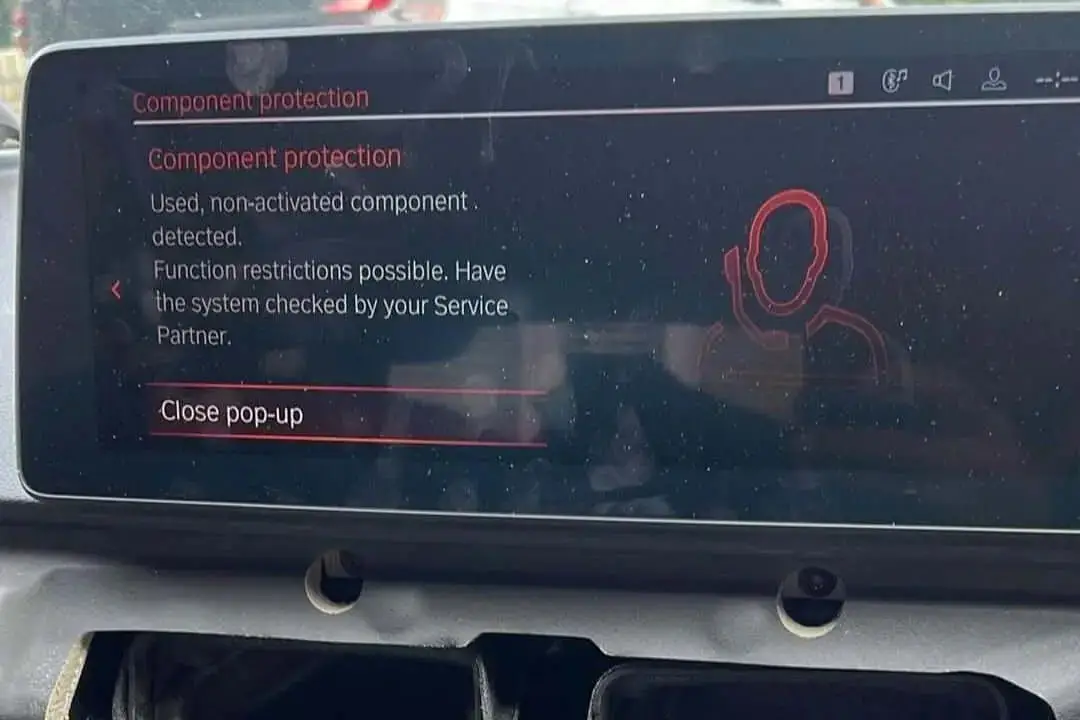
The process to Remove Component Protection ID7/ID8 is essential for technicians and enthusiasts working with newer BMW and Mini infotainment systems. Specifically, this procedure targets the MGU21 head unit, which powers the cutting-edge ID8 and ID8.5 software interfaces. Component Protection (CP) is a security protocol from the manufacturer that ties certain electronic components to the vehicle’s VIN.
Understanding Component Protection
If a control unit like the MGU21 is swapped from a donor car without the proper steps, Component Protection will activate, severely limiting functionality. Features like navigation, media playback, and smartphone integration may be disabled, rendering the unit largely unusable.
Important Notice
The removal process is not a simple coding task and requires specialized software tools and a reliable OBD2 interface to establish a secure connection with the vehicle’s ECUs. It is a technical procedure that involves communicating with manufacturer servers to authorize the component for use in a new vehicle.
Technical Considerations
Attempting to Remove Component Protection without the correct knowledge or tools can lead to module bricking or fault codes. It is highly recommended to use proven professional services or trusted software solutions designed specifically for MGU21 CP removal.
Use Professional Tools
Specialized software and hardware required
Stable Power Supply
Maintain consistent voltage during process
Data Backup
Always backup original unit data first
What This Service Provides
Complete CP Removal
Full removal of Component Protection for MGU21 Head Units
Feature Restoration
Complete restoration of ID7/ID8/ID8.5 features including Navigation, Media, and Smartphone Integration
Official Authorization
Official server authorization for component reassignment
Secure Process
Secure procedure that maintains module integrity and prevents damage
What You Need
Interface Hardware
ICOM Next or ENET Cable interface for secure vehicle connection
Computer System
Windows PC with stable internet connection for server communication
Power Management
Power supply maintaining stable vehicle voltage throughout the process
Professional Service Process
Compatibility Verification
We verify your MGU21 unit compatibility and current CP status before proceeding
Secure Connection
Establish secure connection using professional interface hardware
Server Communication
Communicate with manufacturer servers for official authorization
CP Removal
Execute the Component Protection removal procedure
Feature Verification
Test and verify all ID7/ID8/ID8.5 features are fully functional
Quality Assurance
Complete system check to ensure no fault codes or issues remain
Ready to Remove Component Protection?
By following the correct protocols, you can efficiently overcome this security feature and restore complete access to all features of the ID8 system.
Contact us on WhatsApp to verify compatibility and schedule your professional CP removal service!
Diego Pineda –
Got FSC 1AA after BDC replacement at dealer—engine runs smoother, better throttle response! Great maintenance add-on. Highly recommend! ⭐️⭐️⭐️⭐️⭐️
Kotaku (verified owner) –
After replacing the BDC3, I noticed that the component protection was active for the HUH. I searched for someone who could remove it remotely and came across Bimmer Expert Code. When I contacted them on WhatsApp, they replied immediately and completed the job quickly and professionally. Thank you for your great help — highly recommended!
Nikolay –
After replacing the BDC on my BMW X5, the radio stopped working. I found this company online; they have fair prices and did everything remotely, quickly and efficiently.